- alfredo · ai · self-hosting
Building Alfredo on an old Windows PC
How an Obsidian wiki, a Telegram bot and a spare Windows PC turned into a personal AI agent, and why I still keep it running myself.
Alfredo, my personal AI agent / chief of staff / butler / commander of forces, currently runs on a very old Windows PC whose main job is to stay on. It is not a server rack, and it does not have blinking lights. It is a spare computer that has somehow become important enough for me to worry about its backups!
Where it started
The origins of Alfredo are in April, with an LLM wiki in an Obsidian vault, because I wanted somewhere to put brain dumps, random ideas and things I might want to use later. I connected a Telegram bot to scripts that sent my messages into the vault, integrated web crawlers, and actually tried to use Obsidian as a daily tool. For a while, it worked, but I eventually stopped using it.
The issue wasn’t that the vault was bad. The issue was that I still had to go to my computer to work with it, while the Telegram script was running on a computer that wasn’t always on. I wanted to capture something from my phone and have it become useful without needing to remember where I put it. Eventually, I stopped trying to make myself use Obsidian as the interface and started treating it as the brain behind something else.
Around then, personal agents like OpenClaw and Hermes were getting a lot of attention, and I wanted to see whether that kind of setup could make my Obsidian workflow actually stick. I chose OpenClaw as the agent runtime, which runs inside WSL2 on the old Windows machine, and Alfredo is the personal agent I’ve built around it. I talk to Alfredo through Telegram, and it can use the Obsidian context and the personal integrations I’ve connected. I was already using Codex personally, so connecting Alfredo to it gave me a model I knew, while keeping the runtime and the rest of the setup under my control.
How the pieces fit together
There’s another important part of the architecture: both the Obsidian vault and Alfredo’s configuration are managed through GitHub. The PC has local checkouts, while GitHub lets me keep the same material available across my computer and phone, so I can talk to Alfredo through Telegram and also keep using Codex in my computer, all sharing the same memory in Obsidian. The Vault isn’t trapped inside the old PC, and the configuration has a history I can inspect.
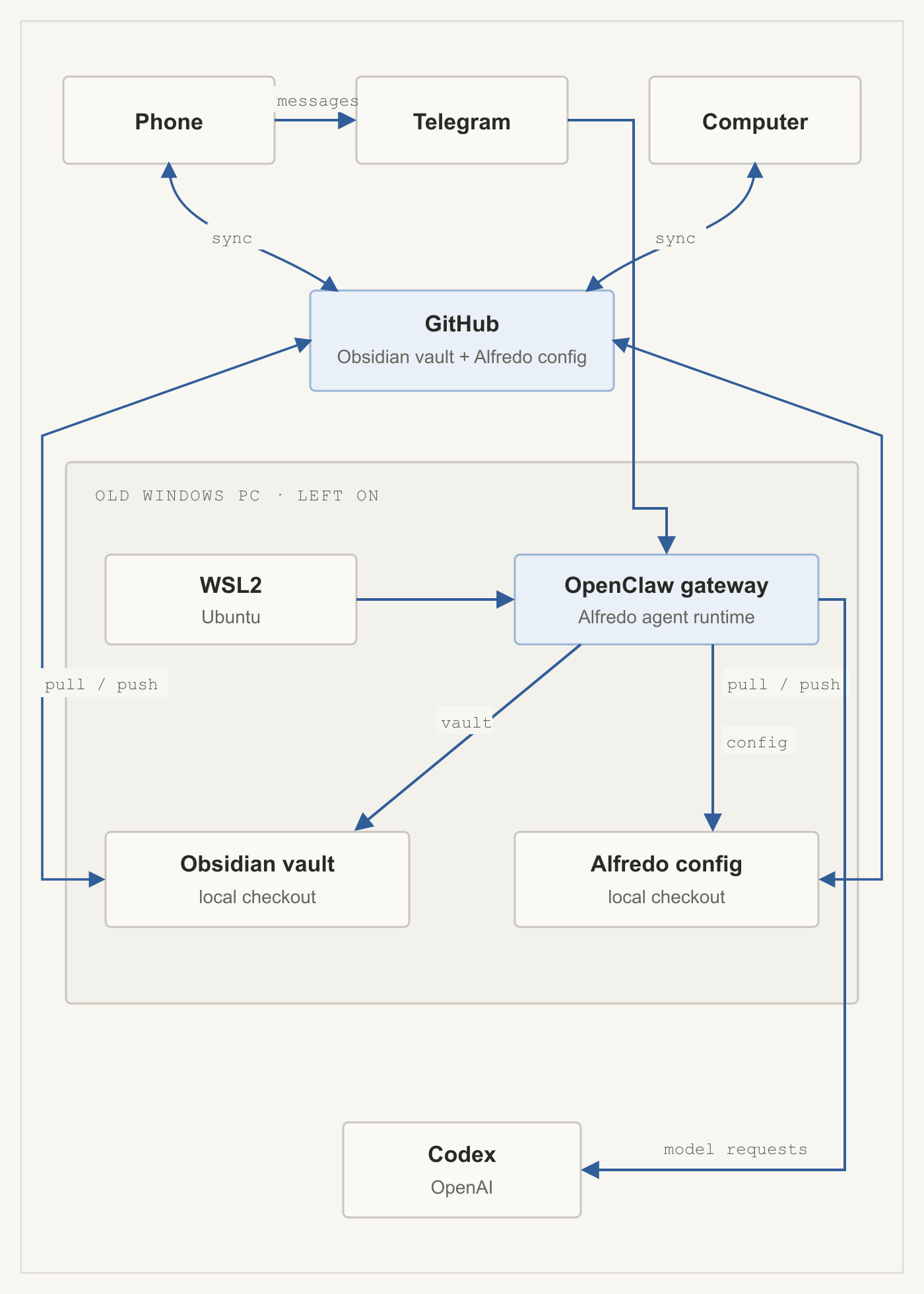
The Vault sync is not just “GitHub keeps a copy”. The server script uses a lock directory so two sync runs don’t overlap, and it stops if another Git operation is already in progress. If it finds local changes, it commits them with a timestamp, then fetches, rebases on origin/main, and pushes:
# Simplified from the WSL server sync script
mkdir "$LOCK" 2>/dev/null || exit 0
trap 'rmdir "$LOCK"' EXIT

git add .
git commit -m "auto-sync-server $(date '+%Y-%m-%d %H:%M:%S')"
git fetch origin
git rebase origin/main
git push origin main
On my computer, the sync script pulls with rebase first, then commits and pushes any local changes:
git pull --rebase

git add .
git commit -m "auto-sync $(date '+%Y-%m-%d %H:%M:%S')"
git push
Both scripts only create a commit when there are changes. The phone and computer can work with the same Git-managed material, while Alfredo reads its local checkout in WSL. That gives me portability and a useful history of changes. It also means GitHub is part of the data flow, so this is not a story about keeping every byte on one machine.
That distinction matters for the privacy question. The runtime is self-hosted, but when Alfredo uses Codex, model requests go to OpenAI. The Vault and configuration are synced through GitHub too. So I only connect personal integrations to Alfredo, as running the agent on my own PC doesn’t magically make hosted inference or cloud storage local.
Why keep running it myself?
Now, the elefant in the room, the question I keep asking myself and probably some of you also wondered: why keep building this when Codex, Claude or Grok Bot can do much of the same? Grok Bot now offers a persistent cloud computer, 24/7 work and phone access, which addresses one of the big reasons I started this in the first place. Its current product description makes it a real alternative, not a hypothetical one.
For me, Alfredo is still interesting because I can inspect and manage the runtime, choose what context and personal tools it can reach, and recover the system myself. That comes with work of course: the old PC needs to stay on, WSL and integrations need maintenance, and a local machine can still fail. That is why disaster recovery became part of the build: Alfredo has encrypted backups and tested restores. “It’s probably fine” is not much of a recovery plan once you rely on the system.
A local model could be another option if I wanted inference to stay on my own hardware and use it for simpler tasks. Combining that with my personal Codex subscription would make it possible to achieve a lot without a new subscription or increased cost, as the cost of usage is increasing and thus the limits of tools like GrokBot are becoming easier to achieve. That would not automatically make professional integrations compliant, though. The data sources, permissions, network paths and company rules would still matter. For now, Alfredo stays personal.
In conclusing, I’m not building this because a self-hosted agent wins every feature comparison. If I only wanted an always-available bot, a managed product might be the sensible choice. I built Alfredo because I wanted to have fun but also understand the whole system: where the context lives, how it reaches the agent, which tools it can use, and what happens when a machine or sync fails. Also, the old PC was already there, and apparently I needed to give it a job!